Understanding the Cute Hot Dog Mascot Vector Pack 03: A Practical Guide for Designers and Marketers
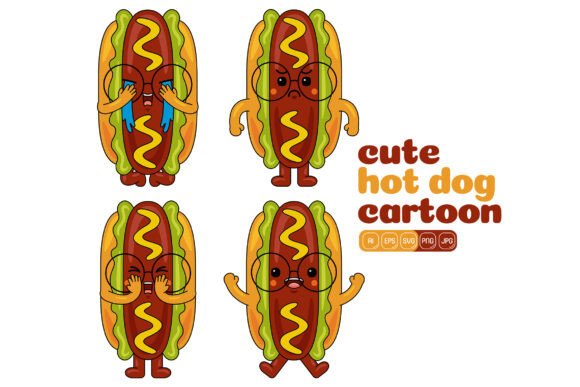
When you need a friendly, food-themed character that can bounce between a social media post, a menu design, and a printed flyer, a well-built vector mascot pack becomes a serious workflow asset. The Cute Hot Dog Mascot Vector Pack 03 offers exactly that: 100 high-resolution vector illustrations built around a single, cheerful hot dog character in a flat design style. But before you add it to your toolkit, it helps to look closely at what the pack includes, where it shines, and how it compares with other ways of sourcing mascot illustrations—whether you are weighing free alternatives, subscription-based libraries, custom commissions, or entirely different visual approaches.
What This Pack Delivers and Why Format Variety Matters
Out of the box, the Cute Hot Dog Mascot Vector Pack 03 provides a bundle of file types that address different parts of a real design workflow. You get native Adobe Illustrator (.ai) files for full editing control, along with EPS, SVG, and PDF formats that bridge the gap between professional vector software and other applications. For quick placement in presentations, web mockups, or social media templates, the pack also includes high-resolution JPG and transparent-background PNG files—every illustration sized at 3000 x 3000 pixels. That resolution handles most print and digital requirements without upscaling artifacts.
Compare this with many standalone vector icons or single-file downloads found on marketplaces. Often those come in only one or two formats. When you need to hand off artwork to a printing vendor who insists on EPS, or import directly into Canva or Figma without conversion headaches, the multi-format approach here removes friction. It also future-proofs the asset: as your software stack changes, you are less likely to hit compatibility roadblocks.
The flat design style is another deliberate choice. Flat illustrations with clean outlines and minimal shading tend to reproduce well across different media—from screen printing on fabric to low-resolution social media headers. They also stay readable at small sizes, which matters for app icons, website footers, or printed stickers. If your brand guidelines lean toward simplicity rather than photorealism or heavy gradients, this stylistic match is strong.
Comparing Standalone Vector Packs with Other Sourcing Approaches
Designers often face three main paths for mascot graphics: buying a pre-made pack, subscribing to a large library, or commissioning custom work. Each has different tradeoffs in cost, flexibility, and time.
A subscription to a major stock platform may give you access to thousands of characters, but the per-asset uniqueness drops. The same smiling food mascot can appear across competitor brands accidentally. The Cute Hot Dog Mascot Vector Pack 03 occupies a narrower niche—100 poses, expressions, and accessory combinations built around one character. Because it is not a wildly popular core library item, brand overlap risk is lower than with a top-selling generic character from a massive portal. Yet it remains far more affordable than a custom illustration set, which could cost 10 to 20 times more and take weeks to deliver.
Against free vector repositories, the differences become starker. Free hot dog mascot illustrations exist, but they rarely come in consistent sets. You might find a waving hot dog here and a dancing one there, each drawn by different artists with incompatible line weights, colors, and proportions. The value of this pack lies in consistency: all 100 illustrations share the same visual DNA. When you place three different poses on a landing page, they look like part of the same family. For brands or campaigns that need to repeat a character across multiple touchpoints—think email signature, invoice template, event badge, and social carousel—that coherence is worth paying for.
Strengths and Practical Advantages in Daily Design Work
One underappreciated strength is the editing flexibility. Because each illustration is vector-based, you can resize without losing sharpness. But more importantly, the pack description emphasizes that you can change colors of every shape and combine different elements to create your own illustrations. This moves the asset from static clip art territory into a semi-modular design system.
Imagine you need a hot dog mascot holding a sign for a summer promotion, then later the same character wearing a chef hat for a restaurant week campaign, and later still a simplified version for a browser favicon. With a single editable character set, you can recolor mustard, swap props, remove the bun, or pull just the face into a new composition. The time savings compound when you work within a consistent brand palette. Instead of redrawing the whole shape, you adjust global swatches. This level of customization often isn't possible with locked-down stock vectors that arrive with flattened layers or grouped-but-not-easily-editable construction.
The pack also includes a generous number of illustrations. One hundred variations give you enough range to tell a visual story: greeting, celebrating, pointing, dancing, relaxing. That breadth supports multi-step infographic sequences, slideshow decks, and narrative-rich social campaigns without the character feeling repetitive.
Where the Pack Fits Best—and Where It Might Fall Short
The Cute Hot Dog Mascot Vector Pack 03 works especially well for:
- Food and beverage brands that need a recurring, approachable character for menus, loyalty cards, and packaging accents.
- Event marketers creating themed materials for cook-offs, summer festivals, or food truck rallies.
- Educators and content creators building child-friendly resources, nutrition guides, or classroom printables where a playful tone is essential.
- Small businesses that want a cohesive mascot across social media profiles, email newsletters, and website illustrations without hiring an illustrator.
That said, there are situations where looking at alternatives makes sense. If your brand demands a highly realistic or three-dimensional feel—perhaps for a premium product packaging that competes on shelf with photographed food—the flat vector style may feel too casual. In that case, a 3D-rendered character or a detailed hand-illustrated watercolor mascot might align better, even if the investment is higher.
Another limitation is the fixed subject. The character is a hot dog. If your menu centers on plant-based bowls or your brand voice is more elegant and minimal, a hot dog mascot—however cute—could send the wrong signal. You would be better served by a pack built around a different food item or an abstract character. Some designers solve this by purchasing the pack and using the editable features to deconstruct the illustrations into useful secondary elements—maybe extracting the banner shapes, speech bubbles, or simple icons that come as accessories—but that requires extra editing effort.
For projects that need animated characters, this static vector pack won't directly give you motion. You would need to import the SVG or AI files into animation software like After Effects or create frame-by-frame animations manually. While possible, it adds a layer of work that a full animated mascot toolkit or a Lottie animation subscription might better serve from the start.
How This Pack Compares with Other Flat-Design Character Sets
When you browse popular vector marketplaces, you will find many flat-design character bundles. Some offer different themes—business people, animals, seasonal icons. The Cute Hot Dog Mascot Vector Pack 03 differentiates itself by narrowing the focus. Instead of 20 business scenes and 20 different characters, it deep-dives into one mascot. This probe makes the pack less versatile for a broad corporate presentation deck but far more targeted for food-centric storytelling.
Consider the alternative of a “food mascot bundle” that includes pizza, burger, taco, and hot dog characters—maybe 25 illustrations each. That sounds diverse, but you often end up with only a few usable poses per character. If your campaign revolves around a hot dog stand, having 100 hot dog variations gives you visual breathing room. You can assign a specific pose to each menu category, each day of a promotion, or each step in a cooking tutorial. That density of one-character illustrations is relatively rare outside niche artist shops.
From a technical standpoint, the file organization also matters. Many cheaper packs bundle all poses into one large AI file with limited layer naming. If this pack is well-structured—with clearly named layers and separated elements—you will spend less time cleaning up before editing. While we cannot see the internal file structure before purchase, the promise of easy color changes and element combination suggests a degree of modular organization that busy designers should seek out.
Decision Factors When Evaluating This Pack for Your Next Project
Rather than asking “Is this a good product?”—which it arguably is for its intended niche—ask whether your current project aligns with what this pack offers most: a ready-to-edit, consistent, one-character system in a friendly flat style. Here are a few practical checkpoints:
- Brand consistency: Does your brand palette map easily onto the existing artwork? Test by imagining re-coloring the hot dog’s bun, the mustard, and the accessories. If your brand uses neon brights or subtle pastels, you can likely adjust without issue.
- Volume need: Will you realistically use 20, 50, or all 100 illustrations? If you only need two poses for a single flyer, a smaller pack or a pay-per-illustration model might save money. But if you see yourself returning to the character quarterly for new promotions, the per-illustration cost drops significantly.
- Style match: Place a sample illustration next to your existing marketing materials. Does the thick- or thin-line style, the proportion of the eyes, and the overall whimsy level sit comfortably with your logo and typography? Even a minor style mismatch can undermine brand polish.
- Software access: You will need vector editing software to unlock the full customization. If your team works entirely in Canva or PowerPoint with no Adobe Illustrator or Affinity Designer access, you may rely more on the ready-made PNG and JPG files and accept less customization. That’s perfectly usable, but you would be leaving some value on the table.
Using the Pack for Infographics, Web, and Print: Practical Scenarios
Imagine you are designing a nutrition infographic for a children’s health website. The hot dog mascot can serve as a friendly guide, pointing to data points, holding up number signs, and reacting with surprised or happy expressions to each fact. Because you have 100 poses, you never reuse the same stance back-to-back, keeping the infographic visually dynamic. You export the chosen poses as SVG for the website, ensuring crisp rendering at any screen size, and as CMYK PDFs for the printable handout version. The transparent PNG gives you flexibility to layer the character over colored backgrounds without white boxes.
For a social media campaign, you might combine elements from different illustrations: take the hot dog holding a blank sign from one file and the chef hat from another, then recolor the sign to match your weekly special. The flat design style also performs well on mobile screens where overly detailed illustrations can become muddy. And because the pack is resolution-independent as vectors, you can crop tightly for a profile picture or scale up for a trade show banner without pixelation.
When the Right Choice Might Be Something Else
This pack is not a one-size-fits-all solution. If your project timeline is a few hours and you can’t spend time editing, you might prefer a stock photo of a real hot dog or a simpler icon set that doesn’t require customization. For brands that have already established a different mascot, forcing a hot dog into the mix just because the pack is cute can confuse rather than delight customers. Additionally, if you plan to trademark the character, using a pre-made illustration pack creates complications; you would not own exclusive rights, and other businesses could legally use the same artwork. In that specific legal scenario, a custom-designed exclusive mascot is the safer route.
Some designers compare this pack with customizable mascot generators available online. Those tools let you mix and match body parts, expressions, and colors through a browser interface and output a PNG. While convenient for quick one-offs, generators rarely give you vector files with the same depth of control over individual anchor points. The Cute Hot Dog Mascot Vector Pack 03 sits in a middle ground: more flexible than a generator’s locked ecosystem, but less tailor-made than a commissioned artwork.
Making an Informed Decision
The appeal of this pack is easy to understand: 100 cheerful, editable hot dog illustrations in multiple formats, ready to drop into almost any project that needs a food mascot with personality. For the right use case, it can replace weeks of back-and-forth with an illustrator or the compromise of cobbling together mismatched free vectors. The key is matching your actual design needs to what the pack provides. If you need a consistent, versatile, and affordable character system in flat design, and a hot dog fits your message, this pack offers strong practical value. If your brand identity demands a different artistic direction, exclusivity, or animation, you would benefit from exploring complementary resource types rather than forcing a square peg. Either way, understanding the features, the file flexibility, and the natural limits of a pre-made vector collection helps you decide with clarity, without being swayed by the cuteness alone.