Cute Starfruit Mascot Vector Pack 03: A Practical Asset for Dynamic Visual Projects
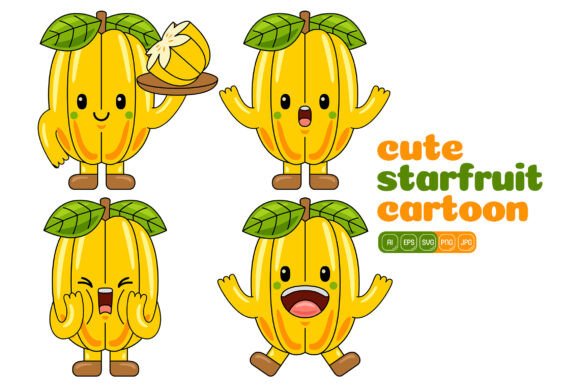
Designers, marketers, and small business owners often find themselves balancing brand consistency with creative variety. The challenge becomes how to produce fresh, engaging visuals without starting from scratch each time. This is where a well-structured vector illustration pack enters the workflow. The Cute Starfruit Mascot Vector Pack 03 offers a collection of 100 high‑resolution, flat‑design starfruit character illustrations that can be adjusted, combined, and applied across countless media formats. Rather than being a static bundle, it functions as a flexible visual system—one that adapts to changing project requirements while maintaining a cohesive look.
When you bring a resource like this into your process, you are not just downloading files. You are acquiring a set of building blocks that can shorten design cycles, reduce dependency on custom illustration, and still deliver polished results. Understanding how to integrate it smoothly with your existing tools, platforms, and brand guidelines makes the difference between a random clip‑art folder and a genuine productivity asset.
Understanding the Role of Mascot Illustrations in Design Workflows
Mascots create an approachable, human‑like touchpoint that static icons or abstract shapes cannot always provide. A cheerful starfruit character can add warmth to a landing page, break up dense information in an infographic, or serve as a recurring brand element across social media posts. The Cute Starfruit Mascot Vector Pack 03 is built around this idea. Its illustrations vary in pose, expression, and supporting elements, giving you enough range to tell a story without losing visual identity.
In practical terms, these characters can appear early in the design process as placeholder art to establish the tone of a project, or later as refined final assets. Because the pack uses a consistent flat design style, multiple illustrations can sit side by side without clashing. This matters when you work on multi‑page brochures, slide decks, or an ongoing social campaign that requires weekly updates.
What’s Included in the Cute Starfruit Mascot Vector Pack 03
Knowing the technical makeup of a resource allows you to plan how it fits into your toolchain. The pack includes:
- 100 vector illustrations – each featuring the starfruit mascot in unique scenarios and poses.
- Multiple file formats – AI, EPS, SVG, and PDF for vector editing, plus JPG and PNG (with transparent background) for quick placement.
- High resolution – all assets are 3000 × 3000 pixels, making them suitable for both digital screens and print outputs up to 10 inches without upscaling.
- Flat design style – clean, modern look that integrates well with contemporary UI, infographics, and branding.
- Layered, editable files – each shape can be selected, recolored, resized, or combined with other elements inside Adobe Illustrator or compatible software.
Having these formats ready eliminates the friction of file conversion. If your primary tool is Adobe Illustrator, you can work natively with the AI or EPS files. If you prefer Affinity Designer, Inkscape, or Sketch, the SVG version will import cleanly. For quick mockups or presentations, dragging a PNG into PowerPoint or Canva becomes a matter of seconds.
Preparing Your Design Environment for Seamless Integration
Before you start dropping mascots into layouts, a few preparatory steps help you avoid rework later. First, set up a master color palette file. The pack’s flat design style invites recoloring, and building a small palette that matches your brand’s primary and secondary colors takes only minutes. Save that palette inside Adobe Illustrator or as a global color swatch library so every starfruit variation stays aligned with your identity.
Second, organize the files on your drive using a clear naming convention. Instead of leaving them in the default folder, create subdirectories for “Original Vector Files,” “Brand‑Recolored,” and “Exported PNGs.” This small organizational habit prevents you from accidentally editing the source copies and losing the originals. It also makes it easier to locate the correct asset when a colleague or client asks for a specific version.
Finally, test the SVG and EPS compatibility in your preferred apps. While the pack is designed for Adobe Illustrator, opening a sample file in other software confirms how layers, gradients, and masks translate. Catching any translation quirks early means you can decide on a standard working format for the project and avoid mid‑workflow surprises.
Practical Applications Across Digital and Print Media
The real strength of the Cute Starfruit Mascot Vector Pack 03 is its versatility across channels. Below are scenarios where the assets become a natural fit, with specific workflow notes for each.
Social Media Content and Campaigns
Social platforms reward consistency and recognizability. Using a mascot as a recurring visual signature helps your posts stand out in a feed. Take one starfruit character and create variants with different colored accessories or backgrounds for a week‑long promotional series. Because the illustrations are vectors, you can export the exact square, portrait, or story dimensions without pixelation. For Instagram, export a 1080 × 1080 PNG; for a LinkedIn banner, scale up and crop a wider composition. The 3000 px base gives you the headroom to do this without losing quality.
Infographics and Data Visualizations
Data heavy content benefits from visual anchors. Place a small starfruit mascot near chart titles, as a bullet point marker, or as a playful indication of a “tip” or “note” section. Since each element in the vector is editable, you can remove unnecessary details and keep only the relevant part—such as an arm pointing at a key statistic. This selective use maintains the infographic’s clarity while injecting personality.
Print Materials, Packaging, and Stationery
For print designers, the pack’s 3000 × 3000 JPG and PDF versions provide enough resolution for small‑to‑medium print runs, such as flyers, table tents, or sticker sheets. The PNG with transparency is particularly useful for merchandise mockups where you need to place the character on a mug or tote bag without a white box. If you require a spot color version for screen printing, open the AI file, assign Pantone values to the shapes, and export separations. The flat design style simplifies this process because there are no complex gradients to break down.
Website and Landing Page Elements
Mascots can replace generic hero images or serve as error page illustrations. With the Cute Starfruit illustrations, you can craft a lightweight, responsive spot that loads quickly as an inline SVG. SVGs are text‑based and can be further animated with CSS or JavaScript, turning a static fruit character into a subtle hover animation or a progress indicator. Because the pack delivers SVGs directly, you skip the step of recreating or tracing the artwork for web use.
Customizing and Combining Elements for Unique Visuals
A common mistake when using stock illustration packs is to treat each file as a finished, unchangeable image. The Cute Starfruit Mascot Vector Pack 03 is built to be deconstructed and remixed. In Adobe Illustrator, open any AI file, and you will see the starfruit body, facial features, props, and backgrounds as separate grouped objects. This structure lets you:
- Swap the fruit’s color from yellow to a seasonal green or a branded orange.
- Combine the body from one illustration with the hat or prop from another to create a hybrid pose that doesn’t exist in the original set.
- Remove the background entirely for a transparent PNG that integrates cleanly into any layout.
- Add shadows or highlights by duplicating a shape and adjusting its opacity, moving the pack beyond strict flat design if your project requires depth.
This recomposition approach transforms a set of 100 illustrations into a much larger creative library. During a typical design sprint, you can build exactly the character you need in minutes rather than waiting for a custom illustration or forcing a pre‑made image to fit a slightly off‑brand context.
Maintaining Visual Consistency and Quality Control
When a team works with a shared asset pack, drift can happen. One designer might stretch a character disproportionately; another might apply a neon filter that clashes with the brand. To prevent this, create a simple one‑page usage guide. List the approved color codes, minimum size (so details remain legible), and examples of correct and incorrect usage. Attaching the original AI files as the single source of truth, with instructions to edit only copies, helps everyone stay aligned.
Quality control also means checking exports. Because the pack includes high‑resolution JPG versions, it’s tempting to rely on them for everything. However, for any resizing operation, always return to the vector source. Rasterizing before scaling introduces blur; vectors avoid that issue entirely. The PNG with transparency is ideal for web placement, but confirm that the transparent edge is clean when placed over a dark background—sometimes a faint white halo appears depending on the export settings. A quick check in a browser at 100% zoom confirms the final appearance.
Exporting and Resizing for Multiple Platforms
The pack’s 3000 × 3000 pixel dimensions serve as a generous master canvas. From there, export presets can be built once and reused. In Adobe Illustrator, the “Export for Screens” dialog can generate JPEG and PNG versions at 1x, 2x, and 3x resolutions simultaneously. This is especially handy for web projects that require @2x retina images. For print, open the PDF or AI file in InDesign or directly in Illustrator to set a precise print‑ready size. Because the art is vector, you can scale the starfruit mascot to billboard dimensions without quality loss, though the level of detail might demand some simplification at extreme sizes—which is easy to do by removing very fine lines before upscaling.
If you work across different software, the SVG format becomes the bridge. Open the SVG in a text editor, and you can change fill colors directly in the code—a useful trick for developers implementing dark mode versions. This cross‑discipline flexibility makes the pack a shared resource between design and development teams, reducing the back‑and‑forth handoff time.
Long‑Term Value and Asset Organization
Assets like the Cute Starfruit Mascot Vector Pack 03 gain value over time if they are kept accessible and well‑catalogued. Consider tagging each illustration with descriptive keywords: “happy,” “pointing,” “holding sign,” “summer,” etc. Many digital asset management tools or even simple folder names (e.g., “Social Media / Starfruit_Poses”) can serve this purpose. When a new project brief arrives requesting a “friendly fruit character for an outdoor festival banner,” you can locate the relevant subset in seconds rather than scrolling through 100 unlabeled files.
Another long‑term benefit is building a template collection. Once you have customized a starfruit mascot for a particular campaign, save that composition as a template file. Next quarter, you can reopen the template, adjust the text or background colors, and export a new version with minimal effort. This approach transforms a one‑time purchase into a reusable springboard that keeps your content fresh while protecting your time.
Finally, remember that the pack’s flat design style remains aesthetically resilient. Trends come and go, but clean, simple shapes with clear attitudes rarely look dated. This makes the starfruit mascot suitable for projects that need to stay live for months—such as onboarding tutorials, knowledge‑base graphics, or permanent website illustrations—without worrying that the style will feel out of place next year.
By treating the Cute Starfruit Mascot Vector Pack 03 as an editable system rather than a static download, you integrate it into your creative toolkit in a way that supports speed, consistency, and brand expression. The combination of editable vector formats, generous resolution, and varied poses makes it a practical choice for anyone who produces visuals regularly—whether for client work, personal projects, or ongoing marketing efforts. With thoughtful preparation and organized usage habits, these starfruit characters become more than cute icons; they become reliable components of a smooth, professional design workflow.