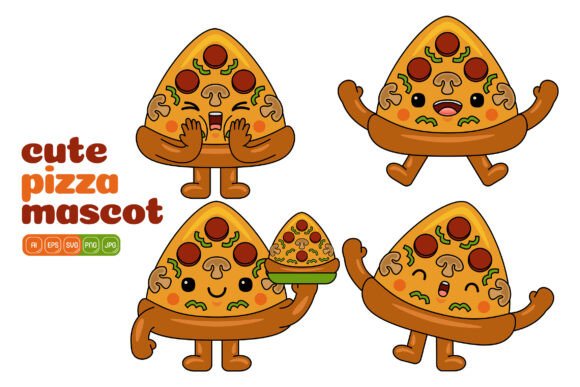
Transforming Everyday Projects with Cute Pizza Mascot Vector Pack 04
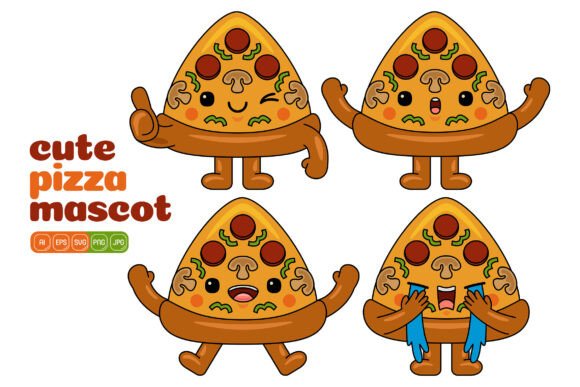
Most small business owners and content creators don’t start their day thinking about vector file formats. They think about the lunch rush, the next social media post that needs to go live, or a menu board that looks a bit too plain. That’s exactly where Cute Pizza Mascot Vector Pack 04 slides in—not as a flashy design promise, but as a real, ready-to-use collection of 100 individual pizza mascot illustrations that can quietly solve dozens of visual problems without demanding a degree in graphic design.
If you have ever stared at a blank canvas in Canva, Photoshop, or Illustrator and wished you had a friendly, smiling slice of pizza holding a sign or giving a thumbs-up, this pack answers that wish. It’s not a subscription service or a template that locks you into a specific layout. You get actual vector files that you can open, tweak, repurpose, and combine any way you want. The flat design style keeps things clean enough for a modern website yet playful enough for a kid’s party invitation.
What’s Actually Inside the Pack
Rather than starting with a feature list, imagine unzipping a folder and seeing a hundred different pizza characters. Some are slices, some are whole pizzas with smiling faces, some hold utensils or wear tiny chef hats. All of them share a consistent visual language, which means they can sit side by side on the same webpage or printed flyer without clashing. Because they come in high resolution at 3000 x 3000 pixels, they hold up on everything from a small mobile screen to a poster on a window.
You get multiple file formats in one purchase: AI and EPS for Adobe Illustrator users, SVG for web-based projects and modern design apps, PDF for quick sharing and printing, plus JPG and PNG options. The PNG files include a transparent background, so you can drop a cheerful pizza mascot onto any color surface or photo without awkward white boxes. This blend of formats means the pack fits into very different workflows, whether you’re a freelancer working in Affinity Designer, a teacher assembling Google Slides, or a print shop owner preparing a batch of stickers.
When a Friendly Pizza Character Makes the Difference
There are moments in marketing and communication where a photo of real food feels too serious or too expensive to produce. A hand-drawn style vector, especially one that looks approachable and slightly animated, can create a lighter tone. Think about a push notification from a food delivery app that says “Your pizza is on the way!” accompanied by a tiny mascot giving a wave. That small visual cue reinforces brand personality without taking up much screen real estate. A social media manager could pair a pizza character peeking over a text box with a discount code announcement, making the post feel less like an ad and more like a friendly nudge.
Educators working on nutrition or cooking modules might use these illustrations to create counting games, food group charts, or menu-planning activities. The ability to resize a vector without losing quality means you can blow up a single pizza mascot to fill a poster for a school cafeteria or shrink it down to fit inside a reward sticker. A parent organizing a pizza-themed birthday party could pick a couple of characters, change their colors to match the party decorations, and print them on cupcake toppers, thank-you cards, and banner flags—all from the same source file.
Real-World Scenarios Where the Pack Proves Its Worth
Consider a pizzeria owner who wants to refresh their takeout menus but doesn’t have the budget for a custom illustration series. With Cute Pizza Mascot Vector Pack 04, they can open an EPS file in Illustrator, adjust the color of a pepperoni slice to match their brand red, and position a smiling whole pizza next to the “Family Meal” section. Because the designs are flat and simple, they won’t distract from the menu text, but they will make the items feel more curated.
A freelance web designer building a landing page for a Italian restaurant chain could use several mascots as section dividers or loading animations. SVG files make this especially easy—they can be styled directly with CSS or animated with a few lines of code. The mascot holding a “Reserve a Table” sign becomes a call-to-action button that doesn’t look like every other rectangular button on the internet. Meanwhile, a food blogger who writes about homemade pizza recipes can sprinkle these illustrations into recipe steps, using a mixing bowl mascot next to the dough preparation instructions and a slice character next to the serving suggestion.
Printing businesses and sign makers get a reliable asset too. Since vectors scale infinitely, you can take the same mascot and create a storefront decal, a small fridge magnet, or a large banner for a food festival. No need to trace or redraw anything. The flat design style also means fewer ink layers if you’re screen printing on merchandise, which can keep production costs predictable.
How Different Users Combine and Customize Elements
One of the less obvious strengths of this collection is that you aren’t limited to using the illustrations exactly as they are. Because each shape is editable, you can take the hat off one character and place it on another, or stretch a slice into a speech bubble shape. Someone designing an infographic about pizza consumption statistics might use a character holding a magnifying glass next to survey data, then place a worried-looking pizza next to a statistic about unpopular toppings. The consistency in style means even these mashups look intentional, not like a collage of unrelated clip art.
A marketing coordinator for a frozen pizza brand might need a series of step-by-step oven instructions. They could pick a mascot pointing to a timer, another holding a baking tray, and a third giving a thumbs-up for the finished product. By adjusting the colors to match the brand’s orange and yellow palette, the whole sequence feels custom-made without an illustrator getting involved. Hobbyists who run online shops on platforms like Etsy can use the PNG files to create printable party games, iron-on patches, or digital journal stickers. The transparent background PNGs slot directly into designs without cleanup work, which matters when you are assembling items in bulk.
Deciding If This Pack Fits Your Workflow
Before downloading, it helps to think about the software you actually use. The AI and EPS files assume some familiarity with vector editing. If you’ve never opened Adobe Illustrator or a comparable program, you might rely more on the PNG, JPG, or SVG versions. You can still change colors by using a free vector tool like Inkscape to open the SVG, but if your goal is quick drag-and-drop into a PowerPoint slide, the high-resolution PNGs may be all you need. The pack doesn’t restrict you to one path.
Also consider the tone of your project. These mascots are undeniably cute and cartoony. That warmth works beautifully for family-friendly brands, casual dining spots, classroom materials, and lifestyle content. If your business is a high-end Neapolitan pizzeria with a minimalist black-and-white aesthetic, you might use these sparingly—perhaps for a special kids’ menu page rather than the main brand voice. That’s not a limitation of the pack; it’s about aligning visuals with the message you want to send.
Another practical angle is licensing. Since this is a commercial vector pack, you can typically use the illustrations in client work, merchandise, advertisements, and digital products. But you’d want to confirm the specific terms—most standard licenses don’t allow reselling the individual vectors as standalone clip art, but using them inside a larger design like a t-shirt or blog graphic is usually fine. This distinction matters if you plan to build a product line around a single character.
Small Efforts That Change the Output Dramatically
Even simple tweaks can make the same illustration work across seasons and campaigns. Changing a pizza mascot’s color palette from bright summer tones to warm autumn oranges can shift the mood for a fall promotion. Adding a simple phrase inside a speech bubble next to a character turns it into a social media quote tile. Layering a sliced pizza mascot behind a semi-transparent text box creates an engaging Instagram Story background that doesn’t overpower the message. These small acts of customization are where Cute Pizza Mascot Vector Pack 04 stops being a static asset and starts acting like a flexible toolkit.
A content creator posting weekly pizza reviews could develop a consistent visual language by always using the same mascot as a rating indicator—maybe a pizza slice that wears a chef hat for excellent ratings and a plain slice for average ones. Viewers start to recognize the character, which builds a subtle but memorable brand element without needing a full custom character design.
Why Flat Design and High Resolution Matter Daily
Flat design is practical. It downloads faster on websites because vector data is lightweight compared to detailed photographic images. It prints cleanly on textures like kraft paper or fabric without losing legibility. The 3000-pixel resolution means you can crop a detail—like just the face of a pizza mascot—and still have enough pixels for a crisp profile picture or app icon. When you’re in a rush to create a last-minute flyer for a weekend special, knowing you can resize without pixellation reduces one layer of stress.
File compatibility also affects how quickly you can move from idea to published asset. The PDF file is often overlooked but incredibly useful for sharing proofs with clients or printing directly from a standard PDF viewer. The JPG files provide a one-click option for inserting into Word documents or email newsletters without worrying about transparency settings. Having all these formats in one pack means you spend less time converting files and more time arranging them.
Integrating the Mascots Without Overcomplicating the Design
A common mistake when using pre-made illustrations is overcrowding. These pizza mascots have enough personality that one or two per page go a long way. On a website hero section, a single pizza mascot holding a welcoming gesture next to a headline creates focus. On a printed voucher, a small character in the corner adds charm without competing with the barcode and terms. The key is to let the illustration support the information, not fight it. Because you can recolor each element, you can always tone down a bright yellow cheese to a softer pastel if your design needs a quieter look.
For infographics, a sequence of labeled pizza mascots can guide the eye from one statistic to another. Rather than using standard arrows, a line of tiny pepperonis or a character pointing creates a more thematic flow. Since the pack includes 100 different variations, you can choose specific poses that match the action in your data story—pointing, presenting, celebrating, or even looking puzzled next to a surprising number. That kind of visual storytelling keeps readers engaged longer than basic charts and bullet points.
Bringing It All Together for Everyday Users
Not every pizza shop owner, blogger, or teacher is a designer, and they shouldn’t have to be. Cute Pizza Mascot Vector Pack 04 fills the gap between wanting professional-looking visuals and not having the time or budget to commission custom artwork. It respects the reality that sometimes you need a cheerful pizza holding a blank sign at 11 p.m. before a morning deadline. It’s ready then, in the exact format you need, without watermarks or surprise upsells.
Whether someone ends up creating a new menu board, a classroom activity sheet, a series of YouTube thumbnails, or a line of enamel pins, the process stays straightforward. Choose a character, adjust a color, resize, and place. That direct path from idea to finished material is what makes a well-organized vector pack genuinely useful in everyday life—not just something you download and forget.