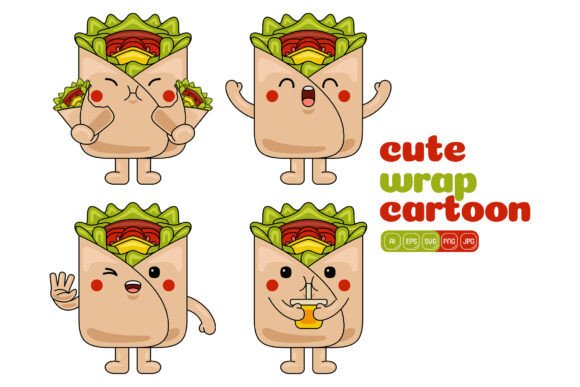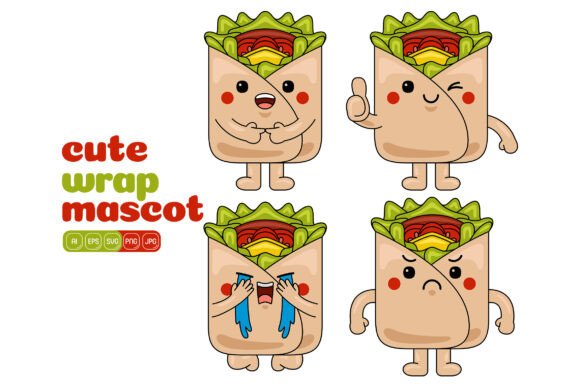
Cute Wrap Mascot Vector Pack 01
If you've ever stared at a blank canvas wondering how to inject a little warmth and personality into your design, you already know that the right character can change everything. The Cute Wrap Mascot Vector Pack 01 is a collection of friendly, flat‑style illustrations built to solve that exact problem—without requiring you to be an illustrator. Packed with 100 distinct vector mascots, it gives you the raw material to create everything from playful social media posts to polished print flyers, all while keeping the process genuinely enjoyable.
What’s Inside the Cute Wrap Mascot Vector Pack 01?
This isn’t a small bundle of three or four similar characters. You get 100 high‑resolution illustrations, each designed in a clean flat style that feels modern and approachable. All artwork sits inside a 3000 x 3000 pixel canvas, which is enough for most digital and small‑to‑medium print needs. More importantly, you receive multiple file formats so you’re never locked into a single piece of software:
- AI – Native Adobe Illustrator file for deep customization
- EPS – Openable across many vector apps and older Illustrator versions
- SVG – Perfect for web, Canva, Figma, or any tool that reads scalable vectors
- PDF – Great for quick previews, sharing, and printing
- JPG – High‑resolution raster image ready to drop into any project
- PNG – Same crisp quality but with a transparent background, ideal for layering
Because the mascots are fully vector‑based in their source formats, you can resize them endlessly without losing quality. Need a tiny icon for a mobile app? No problem. Need a 3‑foot‑wide banner graphic? The edges stay crisp. And because every shape inside each illustration is separated logically, changing colors or tweaking a character’s expression becomes a matter of a few clicks—no redrawing required.
Why Flat Design Mascots Work So Well
Flat design has stuck around for a reason. It strips away unnecessary textures and drop shadows, leaving behind clear silhouettes and bold colors that read instantly on any screen. When you pair that with a cute, friendly mascot, you get a visual tool that builds trust and softens a brand’s tone without looking childish. A finance app might use a mascot to make a budgeting tip feel less boring; a bakery could put one on a loyalty card to spark a smile. The Cute Wrap Mascot Vector Pack 01 taps into that emotional pull while staying versatile enough to fit a wide range of industries—from education and health to e‑commerce and lifestyle blogs.
Where These Vector Illustrations Shine
Because the pack was built for flexibility, it slides naturally into dozens of real‑world uses. Here are just a few places where these mascots can save you time and energy:
- Infographics – Place a mascot next to key data points or use it as a friendly guide walking through a step‑by‑step process. Small size adjustments and color swaps let you match your brand palette perfectly.
- Social media – Turn a quote card, a story highlight cover, or a promotional post into something people actually stop scrolling for. The transparent PNG files make it easy to overlay mascots on photos or patterned backgrounds.
- Print material – Flyers, brochures, event tickets, stickers, and even simple packaging can benefit from a consistent character. Use the AI or EPS files to scale the artwork to exact print dimensions without any pixelation.
- Websites and landing pages – Add a mascot near your sign‑up form, in a 404 page, or as a visual anchor in a hero section to create a more inviting atmosphere.
- Banners and headers – Whether it’s an email newsletter banner, a blog post header, or a YouTube channel art, these illustrations bring a human touch to spaces often dominated by generic stock photos.
What makes this pack especially practical is that you aren’t forced to use the characters exactly as they come. You can combine different elements—a hat from one mascot, a gesture from another, a prop from a third—and literally build your own unique illustration. This means the 100 starting points can turn into hundreds of custom compositions over time.
Customization Without the Headache
If you’ve ever hesitated to buy vector packs because you weren’t sure you could edit them, this one is designed to lower that barrier. The AI and EPS files keep shapes grouped and layered logically, so you don’t need to untangle a mess of paths. In Adobe Illustrator, you can select any component (like the mascot’s scarf or its eyes) and change the fill color in seconds. Want a whole set of mascots in your brand’s specific teal and coral? Use global colors or the recolor artwork feature, and the change cascades across all selected items.
Working with Adobe Illustrator (and Alternatives)
Of course, Illustrator gives the smoothest editing experience, but you’re not limited to it. The SVG files can be opened in free tools like Inkscape, web apps like Figma or Canva, and even code editors if you want to manipulate them programmatically. The high‑resolution JPG and PNG files require zero editing knowledge—you just drag them into your project. For many beginners, starting with the PNG on a transparent background inside Canva is the fastest path; you layer the mascot over your design, add text, and export. As you gain confidence, you can dip into the vector formats to recolor or restructure the artwork.
Fresh Ideas for Combining Elements
The real creative power of the Cute Wrap Mascot Vector Pack 01 lies in mixing and matching. Suppose you run a small gardening blog. You could take a mascot with a cheerful wave, give it a green color scheme pulled from your logo, and then borrow a little potted plant from another illustration in the pack. Suddenly you have a custom “gardening buddy” that feels unique to your brand—yet it took minutes, not hours.
Educators and course creators often use this approach to build a matching set of characters for different topics. One mascot might hold a book for a reading module, while another holds a magnifying glass for a science lesson. Because all elements share the same flat design style, the final compositions look cohesive, as if they were commissioned from one illustrator. Freelancers and small business owners appreciate this because it sidesteps the cost and waiting time of hiring a custom designer for every tiny variation.
Making Your First Infographic with a Mascot
If you’re new to visual content creation, here’s a beginner‑friendly sequence using this pack. Start by picking a single mascot that feels energetic and open—maybe one that’s waving or smiling directly at the viewer. Open the PNG (transparent background) version in your favorite design tool—Canva, PowerPoint, or even Google Slides work fine for simple infographics. Place the mascot at the top or beside the title. Then grab a color from the mascot’s outfit and use that same swatch for your headings, icons, or chart bars. This tiny act of color coordination makes the whole design look intentional.
Next, add three or four bullet points with small numeric callouts. Because the mascot is already drawing the eye, your key statistics or steps naturally feel more approachable. If you’re feeling adventurous, open the AI or SVG file later and recolor the mascot to exactly match your infographic’s accent color. The process takes practice, but the pack gives you plenty of material to experiment without fear of “ruining” the original.
Print vs. Digital: What You Need to Know
One common hesitation about vector packs is whether the artwork will hold up in print. The short answer is yes, and here’s why. The native AI and EPS files are resolution‑independent; a 1‑inch mascot on a business card and a 30‑inch version on a backdrop will be equally sharp. For quick print jobs, the included JPG at 3000 x 3000 pixels is already high‑resolution enough for most flyers, postcards, or social cards (you’d get around 10 inches at 300 DPI). The PDF version also supplies a print‑ready rendering that many local print shops accept directly.
For digital work, the PNG with its transparent background is your best friend. You can place it over any photo or colored section without a white box ruining the look. The SVG file is equally valuable for web use because it remains crisp on high‑resolution displays and can even be animated with a tiny bit of code. Regardless of the platform you’re designing for, you’ll find a format in the Cute Wrap Mascot Vector Pack 01 that fits the workflow.
Important Considerations Before You Purchase
While this pack makes illustration work much easier, a few points are worth checking against your own needs. First, confirm the license terms—most bundles like this allow broad personal and commercial use but restrict reselling the files as‑is or claiming the original art as your own. If you plan to use the mascots on physical merchandise you sell (like t‑shirts or mugs), you’ll want to be clear that the license covers it, which it typically does.
Second, think about your comfort level with design software. You can absolutely use the JPG and PNG files immediately without any vector editing. However, changing colors of individual shapes or merging elements from two different mascots will require opening the AI, EPS, or SVG files in a compatible program. Free alternatives like Inkscape can handle this, but there’s a small learning curve. The good news is that the illustrations are organized and straightforward, so even a casual user can learn the basics in an afternoon.
Third, consider aesthetic fit. The flat design style is intentionally upbeat and cute. It works beautifully for brands that want to feel friendly, playful, or nurturing. If your brand is ultra‑luxury, extremely corporate, or minimalist to the point of sterility, you may need to recolor heavily or use the mascots sparingly. But for the vast majority of creators, bloggers, coaches, and small businesses, that approachable energy is precisely the point.
Who Will Benefit Most from This Pack?
The beauty of a well‑constructed vector pack is that it serves a wide spectrum of people:
- Beginner designers and hobbyists can use the ready‑to‑go PNGs to elevate party invitations, scrapbook pages, or community social media posts without learning a complex tool.
- Social media managers and marketers gain a consistent mascot system that cuts down on the time spent hunting for cohesive graphics each week.
- Small business owners can build a recognizable visual ambassador for their shop, course, or service without a full branding agency budget.
- Educators and e‑learning developers find a welcoming way to guide learners through modules, worksheets, or presentation slides.
- Freelance designers add a versatile character library to their toolkit, enabling faster turnaround for client projects that need a human touch.
The common thread is efficiency: instead of commissioning or drawing a new illustration every time, you start with a high‑quality base and tweak it to fit the context.
How to Stay Organized with 100 Illustrations
Receiving 100 files can feel overwhelming at first, so a small organization habit pays off. Create a folder with sub‑folders for each file format—one for AI, one for PNG, one for SVG, and so on. Browse through the JPG previews quickly to tag 10–12 favorites you might use often. If you start recoloring mascots for a specific project, save your custom versions in a separate “custom” folder with the palette noted, so you can reuse them later without redoing the work. This small upfront effort turns the pack from a one‑time asset into a reusable design system.
Beyond the Basics: Building a Brand Mascot System
Once you’re comfortable editing individual characters, consider creating a set of variations that share a single color palette and personality. For example, you might designate one mascot to hold a coffee cup for blog posts about morning routines, another to peek over a sign for announcements, and a third to celebrate with confetti for milestones. Because all elements live within the same visual family, your audience will start recognizing the mascot as part of your brand—without you ever hiring an illustrator. The Cute Wrap Mascot Vector Pack 01 gives you exactly that raw canvas.
Whether you’re designing a playful landing page, sprucing up an educational handout, or crafting a friendly social media feed, these illustrations help you work faster while keeping a consistent, human‑centered style. The wide range of file formats means you can jump in immediately, regardless of your favorite design tool, and the ability to recolor or combine elements ensures the mascots never feel generic. Take the time to explore, experiment, and make the artwork yours—after all, the whole purpose of a pack like this is to spark ideas, not to dictate them.