Cute Panda Set: Playful Vector Art That Brings Projects to Life
There’s an undeniable charm that comes with a well-drawn panda. Round faces, soft expressions, bamboo snacks, and gentle movements – they tap into something universally warm. The Cute Panda Set captures exactly that magic, delivering a collection of meticulously crafted illustrations that feel both friendly and surprisingly versatile. It’s not just a batch of clip art. Each character and scene in the set is built with consistency in mind, so you can pull elements into different projects without ever worrying about mismatched styles or amateur edges.
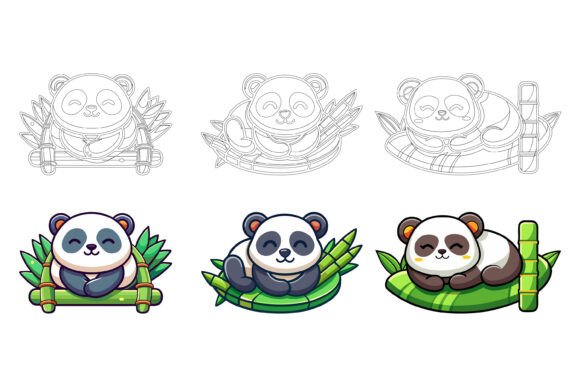
What strikes me first when opening the files is the sense of personality radiating from each pose. You’ll find pandas napping on clouds, holding balloons, reading books, playing with bamboo – little visual stories that invite viewers to pause and smile. The line work is clean, the proportions stay cohesive across the entire collection, and the color palette leans toward soft pastels and natural greens, making the illustrations feel gentle enough for baby shower invitations but crisp enough to use in a professional infographic or an app onboarding screen. That balance is harder to achieve than most people realize, and it’s one of the reasons this set stands apart from the typical stock vector packs floating around online.
Beyond a Single Use: Where the Cute Panda Set Truly Shines
I’ve seen designers get stuck thinking overly thematic illustrations only fit birthday cards or nursery wall art. That assumption undersells what thoughtfully constructed design assets can do. The Cute Panda Set works across a surprisingly broad range of creative and commercial applications precisely because it’s delivered as fully editable AI and EPS vector files. You’re not locked into any preexisting mood or colorway. Need a panda holding a hearts-for-eyes expression in monochrome for a sleek stationery brand? Five minutes in Illustrator and you’re there. Want to recolor an entire scene to match a tech startup’s brand palette? The clean layer organization makes it straightforward.
Small business owners often find a sweet spot here. A bakery that specializes in matcha desserts, for example, could weave a single panda character into packaging design, menu headers, loyalty cards, and social media graphics. Because the Cute Panda Set includes a JPG preview along with the editable vector files, you can quickly drop a rough version into a mockup without opening heavy software, then refine the final assets later. Marketers managing brand identity for eco-friendly or family-oriented companies will appreciate how the soft, approachable feel of the pandas reinforces messages about care, sustainability, and joy without saying a word.
Editorial and Publishing Projects With a Gentle Touch
Children’s book authors and educational publishers often struggle to find illustration sets that support a narrative without overwhelming the page. The pandas here are expressive without being chaotic. Their poses are clear, their emotions readable, and the level of detail hits that sweet zone where the characters feel fully realized yet leave enough negative space for text placement. I’ve watched a self-publishing author repurpose these exact vector graphics across a whole chapter book series, tinting the pandas slightly cooler blue for bedtime scenes and warmer creams for daytime adventures – all possible thanks to the non-destructive editing inside Illustrator.
Even in more grown-up editorial contexts, a subtle panda silhouette or a softly drawn face can anchor an article about wildlife conservation, travel in Asia, or mental wellness. The Cute Panda Set brings a human warmth that stock photography sometimes misses. And because the files are organized with clear layer names and sensible grouping, adjusting scale, rotating elements, or isolating just an accessory like a bamboo stalk or a tiny hat becomes a task that takes seconds, not minutes.
Design Consistency That Speeds Up Real Workflows
One of the first things I check in any premium illustration pack is whether the creator cared about the finish beyond the preview thumbnails. The description for this set mentions “perfection in details and consistency,” and that’s not marketing fluff. I’ve scrolled through the assets and noticed uniform stroke weights, matching shadow angles, and a unified approach to highlights across all poses. When you’re building a series of web banners or social media templates, that cohesion means you spend less time fixing stray anchor points and more time assembling layouts.
Practical workflow considerations also matter. The Cute Panda Set runs flawlessly on both Mac and Windows, which removes friction for freelancers who switch between operating systems or collaborate with remote team members. Even someone still finding their footing with vector software can open the AI file, grab a grouped illustration, drag it into their document, and have a professional-looking result. The learning curve is forgiving, yet the underlying structure is robust enough for advanced designers to dive into gradients, custom color palettes, and complex compositions.
Infographics, App Symbols, and UI-Friendly Graphics
Using illustrated characters in data visualization or app design is tricky. Get it wrong, and the interface feels like a children’s tablet game. Get it right, and the user connects emotionally while still trusting the information. The pandas here strike that balance beautifully. They work as accent illustrations next to statistic blocks, as playful progress indicators in a fitness app, or as category symbols in a product catalog. Since the Cute Panda Set includes simplified shapes and clear silhouettes, you can scale them down for icon sizes without losing legibility – something not all illustration bundles handle well.
For infographics, imagine a “how to stay calm” guide that uses a panda practicing yoga, meditating, and drinking tea. Each scene becomes a visual anchor, and because you can change colors so easily, you can assign a distinct hue to each step while keeping the overall style unified. The vector format means you can export hero-sized images for a poster and the exact same pandas as 64-pixel icons for a supporting webpage, preserving crisp edges at every size. That’s real-world value when you’re juggling deadlines and need assets to perform across mediums without multiple rounds of re-exporting.
Editable to the Core: Why the AI and EPS Structure Matters
I’ve worked with too many “smart” vector packs that arrive with flattened layers, broken type, or weird compound paths that refuse to cooperate. The Cute Panda Set takes a different approach, offering neatly organized files where every element stays separate and logically named. You can recolor a panda’s scarf without selecting its ear by accident, swap a background, or even combine characters from different scenes with minimal effort. That level of editability opens doors for consistent brand identity work – imagine using a single panda character as a recurring mascot, each time adapted to seasonal promos or new product lines while remaining unmistakably yours.
For print projects, the crisp vector lines translate beautifully to business cards, product labels, tote bags, and even large-format signage. Because the illustrations aren’t rasterized inside the AI/EPS files, you retain the flexibility to blow them up to billboard proportions without a trace of pixelation. I’ve seen a small stationery shop turn these pandas into die-cut stickers and enamel pins – the paths were clean enough to send straight to a manufacturer with zero adjustments.
Mixing and Matching: Testing Pairings and Contexts
If you’re building a visual world around these pandas, think about the supporting design assets you can blend in. Soft botanical vectors, gentle watercolor washes, or simple geometric shapes create a rich backdrop without competing for attention. For example, a subscription box brand might place the pandas alongside hand-drawn leaves and modern typography – a clean sans serif font for the logo paired with a delicate script font for pull quotes, letting the illustrations do the emotional heavy lifting. The contrast between organic illustrations and structured type gives the overall layout a polished, intentional feel.
Even in more corporate settings, using approachable animal illustrations humanizes a brand without undermining professionalism. A financial wellness app aimed at young adults, for instance, could deploy a panda holding a piggy bank as a gentle coach illustration, while the rest of the UI sticks to minimalist icons and a neutral sans serif. The key is treating the Cute Panda Set not as decoration but as a strategic brand identity element that makes complex or dry topics feel accessible and trustworthy.
Is This Set Right for Your Next Project?
Before you dive in, think about the audience and the emotional tone you’re chasing. The Cute Panda Set excels in projects that benefit from warmth, charm, and a dash of storytelling – think family-focused campaigns, children’s products, wellness brands, educational materials, pet-related businesses, or any niche where a softer visual approach builds connection. If your core message is aggressive, luxury-focused, or ultra-minimalist, you might need to heavily customize the colors and simplify the backgrounds, which is absolutely doable, but something to plan for.
Check the file inventory. You’ll receive AI, EPS, and JPG formats, which means you have the editable source files plus a quick reference bitmap. The AI file opens in Illustrator, the EPS works across most vector programs, and the JPG is handy for instant previews or social media drafts. Since the set is compatible with both Mac and Windows, there’s no friction when onboarding team members or switching between your home iMac and your work laptop. Commercial licensing is typically included in these bundles, but always verify that the terms match your intended usage, especially if you plan to use the images in logos or merchandise that gets resold.
Realistic Advice for Getting the Most Out of the Pack
Start by opening the master AI file and exploring the layer structure. Spend ten minutes moving groups around and recoloring a single character to get a feel for how the artist assembled the artwork. Then pick a small, low-stakes project, maybe an Instagram story or a thank-you card for a client, and use the Cute Panda Set as the sole visual element. This hands-on test reveals how the illustrations behave under real constraints and sparks ideas you wouldn’t get from just previewing thumbnails.
When it comes to font pairing or supporting typography, lean toward rounded, friendly typefaces for a fully cohesive feel, or introduce a crisp serif font for an unexpected sophistication that offsets the playful illustrations. A display font with gentle curves can mirror the pandas’ round shapes, reinforcing that everything belongs to the same visual family. The goal is harmony, not uniformity.
I’ve watched small business owners, course creators, and even event planners use packs like this to build visual brands that feel handcrafted without the hours of drawing from scratch. The Cute Panda Set removes the barrier between a fuzzy idea and a finished design, while still leaving enough creative control to make the result distinctly yours. That blend of convenience and customization is what makes a well-organized vector illustration collection so valuable, and it’s why getting your hands on editable AI and EPS files feels less like a purchase and more like an instant upgrade to your creative toolkit.